Your library
A library is PxlMonk’s catalog: a database of your photos, their edits and their organisation. Your photo files themselves either stay where they are or live under a folder PxlMonk manages — that choice is the single most important thing to understand about it.
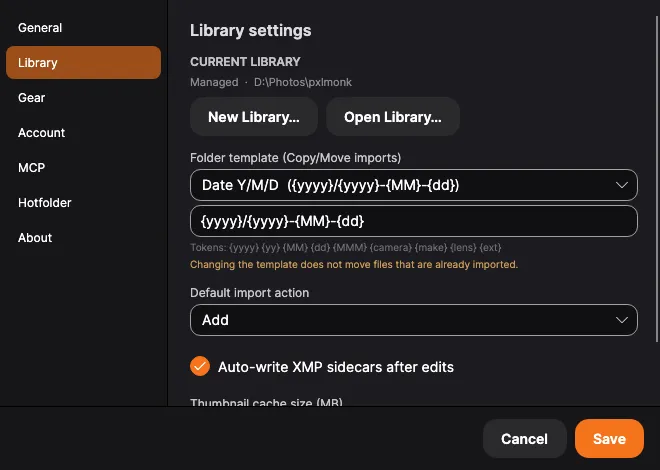
Open Settings → Library to see and manage the current one.
Managed vs Referenced
Section titled “Managed vs Referenced”You choose this when you create a library, and it can’t be flipped afterwards:
- Referenced — PxlMonk indexes your files in place and never moves them. Your existing folder structure stays exactly as it is. This is the default.
- Managed — PxlMonk owns a managed root folder and puts imported originals there, organised by the folder template. Best if you want one tidy, self-contained library.
The CURRENT LIBRARY line shows which mode you’re in and, for a Managed library, where its root is.
Several libraries
Section titled “Several libraries”You’re not limited to one. New Library… creates another; Open Library… switches to an existing one. Only one library is open at a time, and PxlMonk reopens the last one on start.
What import does with your files
Section titled “What import does with your files”The Default import action decides what happens to each file you import — and you can override it per import:
- Add — index the file where it is. Nothing is copied or moved. (The default.)
- Copy — copy the file into the managed root, then index the copy. Your original stays put.
- Move — move the file into the managed root, then index it there. The original is gone from its old location.
The folder template
Section titled “The folder template”For Copy and Move imports, the folder template decides the sub-folder each file
lands in under the managed root. Pick a preset (like Date Y/M/D) or write your own using
these tokens:
{yyyy} {yy} {MM} {dd} {MMM} {camera} {make} {lens} {ext}
So {yyyy}/{yyyy}-{MM}-{dd} files a photo from 25 May 2024 into 2024/2024-05-25.
Other library settings
Section titled “Other library settings”-
Auto-write XMP sidecars after edits — keeps a sidecar file next to each photo so your edits travel with the file. The sidecar is named after the whole photo, extension included:
IMG_0042.CR2.xmp, notIMG_0042.xmp. That is what keeps a raw and a JPEG of the same shot — or two cameras that both counted to 0042 — from overwriting each other’s edits. darktable and digiKam look for the same name; Lightroom and Bridge look for the shorter one and will not find these files. Sidecars written by other software under the shorter name are still read, as long as it is clear which photo they belong to. Your stars, colour label and keywords go into the same file, written the standard way every other application reads — so a rating made here shows up in Lightroom, darktable or digiKam. It works in the other direction too: import a library that already has ratings and keywords in its sidecars and they come across with the photos, instead of being left behind. A rejected photo is recorded the way everyone records it, as a rating of −1; a pick has no standard equivalent and stays in PxlMonk.The file is written a moment after you stop changing things rather than on every keypress, so running 0–5 up a photo while culling writes once, not six times.
-
Thumbnail cache size (MB) — the disk budget for cached thumbnails. Set it too low and browsing re-renders (and re-decodes RAWs) constantly.
Next steps
Section titled “Next steps”- Hotfolder — import automatically from a watched folder.
- Organizing your library — rate, flag and group what you’ve imported.